Add a visual reference
The process starts with a photograph, illustration, product image, or other suitable 2D source. Clear silhouettes and visible features give the system more useful evidence.
Format guide
An image to obj workflow uses a photograph or other 2D reference to help create a three-dimensional mesh in the OBJ format. This guide explains the idea, the process, its limits, and the people who use it.
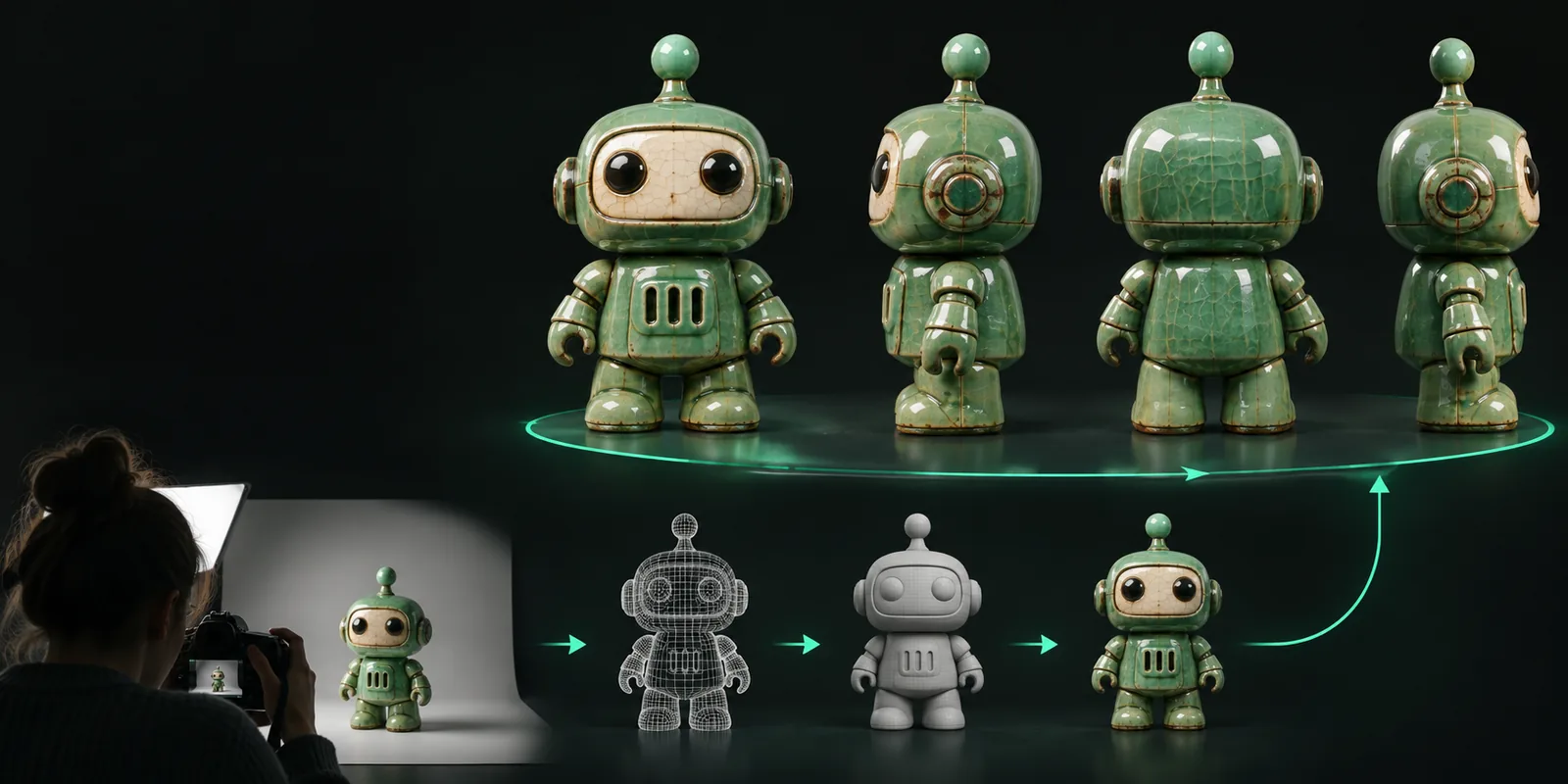
The short answer is that an online image to OBJ tool turns visual reference into a 3D asset that can be opened or refined in compatible modeling software.
Most image to OBJ systems follow a simple sequence: inspect the reference, infer a shape, then prepare the resulting mesh for export or further editing.
The process starts with a photograph, illustration, product image, or other suitable 2D source. Clear silhouettes and visible features give the system more useful evidence.
The image to obj system analyzes contours, surfaces, and visual cues to infer how the subject might exist in three dimensions. Areas hidden from view remain uncertain.
The estimated shape is organized as polygonal geometry that can be opened in 3D software, inspected from different angles, and refined for the intended project.
The value of image to OBJ is speed during exploration. It gives different kinds of creators a starting asset without requiring every shape to be modeled from an empty scene.
01
A designer can use image to OBJ to turn a visual idea into a rough three-dimensional reference for proportion checks, presentation scenes, or early reviews. It is especially useful when the goal is to discuss form before committing to detailed production modeling.
02
Game artists, digital artists, and developers can use an image to OBJ workflow for blocking, scene planning, and asset exploration. The resulting mesh may still need cleanup, retopology, UV work, or material authoring before it belongs in a finished production.
03
For learning and experimentation, image to OBJ makes the relationship between a flat reference and a spatial model easier to explore. A student can compare the source image with the generated geometry, identify missing information, and learn why 3D reconstruction requires assumptions.
An image to OBJ result is useful, but it should be judged as reconstructed geometry rather than ground-truth measurement.
A single image does not reveal the back, underside, or internal structure of an object. The system must infer those areas from visible evidence.
WorkaroundUse multiple reference views when accuracy matters, then inspect and repair the unseen regions manually.
A generated mesh may contain uneven density, stretched polygons, or geometry that is unsuitable for animation and manufacturing.
WorkaroundUse retopology, mesh cleanup, and topology checks before treating the asset as production-ready.
Color and shading in a photograph can be affected by lighting, reflections, and camera settings, so appearance is not the same as a complete material definition.
WorkaroundRebuild materials and textures in the destination 3D software.
An image to obj result is not automatically a survey, CAD model, or dimensionally verified scan.
WorkaroundUse measured references, photogrammetry, or CAD workflows for engineering and manufacturing tasks.
The image to OBJ workflow combines a long-standing 3D exchange format with newer methods for inferring geometry from visual references.
The Wavefront OBJ format emerged as a practical way to describe polygonal geometry and became widely recognized across modeling and rendering tools.
As digital animation and visualization expanded, portable mesh formats helped move assets between specialized applications and production stages.
Photogrammetry, depth estimation, and computer vision made it increasingly practical to infer three-dimensional structure from photographs and image sets.
AI-assisted systems brought image to OBJ and related workflows to browser-based tools, making rapid 3D exploration available beyond specialist pipelines.
The workflow is easiest to understand as a conversion across three kinds of information: a visual source, inferred geometry, and an editable 3D asset.
Now that you know what is image to obj online, you can explore the workflow with a visual reference and evaluate the result in the context of your own project. Treat the first mesh as a practical draft: inspect it, refine it, and decide whether it fits your final use.
These answers address the basic definition, process, and practical expectations behind an online image to OBJ workflow.
It is a browser-based workflow that uses a 2D image as reference for creating a 3D mesh in the OBJ format. The result is an interpreted model, so it may need inspection and editing before use in a finished project.
The system analyzes visible shapes, edges, surfaces, and other visual cues, then estimates depth and constructs polygonal geometry. That geometry is organized as an OBJ mesh that compatible 3D software can open or refine.
One image can provide enough information for a useful starting model, but it cannot directly show hidden sides or internal details. The unseen parts are inferred and may require manual correction or additional references.
Not automatically. Generated geometry may need topology cleanup, scale checks, retopology, UV work, material creation, or dimension verification before it is suitable for a specific production pipeline.
Concept artists, product teams, game developers, educators, students, and makers can all use them for early exploration. The main benefit is creating a workable 3D starting point faster than modeling every detail from scratch.