Imagetoobj

Workflow comparison

Image to OBJ vs 3D Model: Choose the Right Starting Point

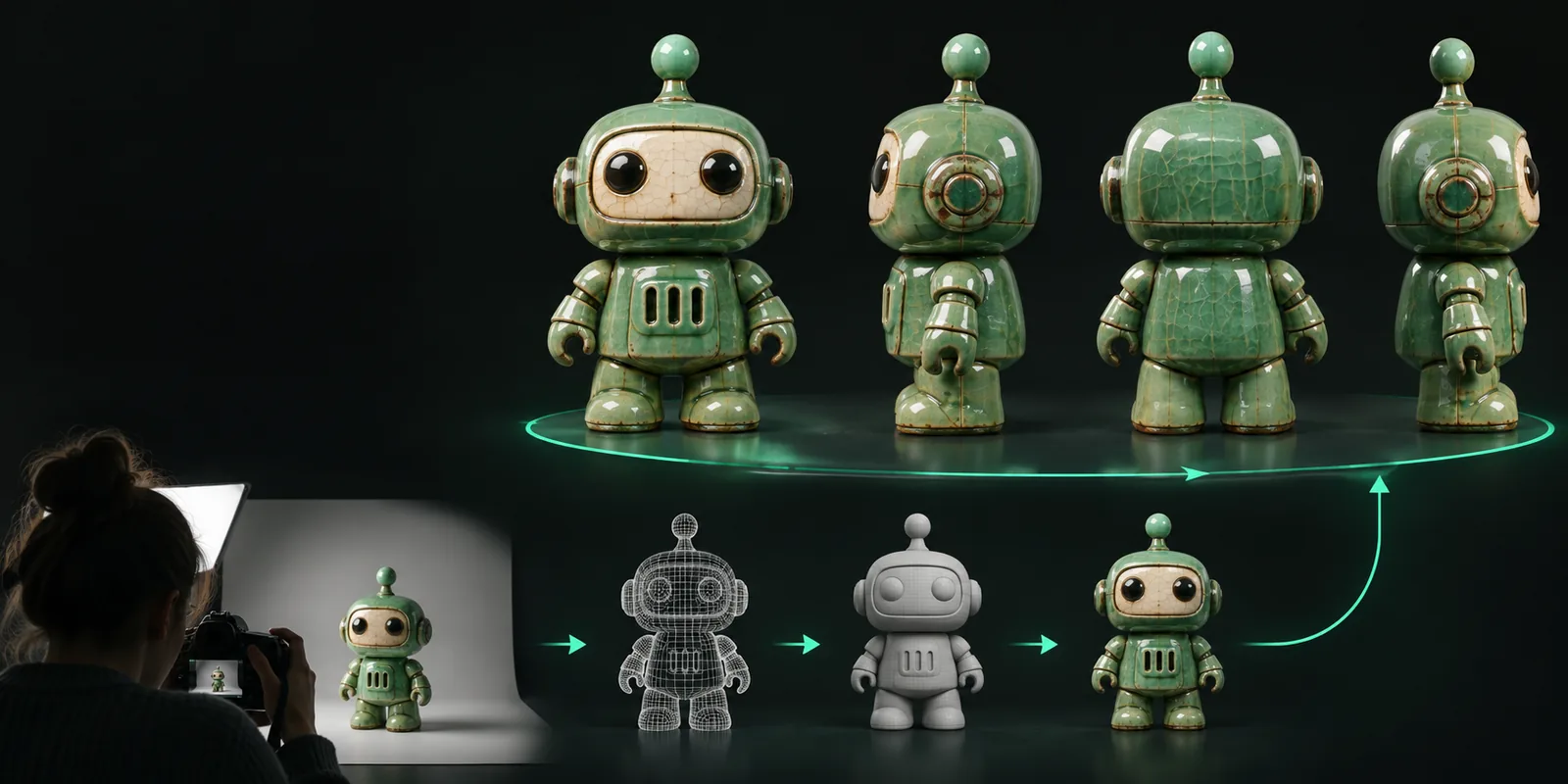
Image to obj vs 3d model is a choice between rapid reconstruction from visual input and deliberate 3D creation with deeper control. This guide compares the trade-offs so you can select a practical route for your project.

A generated 3D object shown beside its source image

Two routes, two different strengths

Neither route wins every project. The better choice is the one that matches the asset’s required level of precision and the cost of getting there.

Recommended

Image to OBJ

Best for a fast, visual starting point

Pros

  • Begins with an image you already have
  • Useful for concept exploration and visual reference
  • Can shorten the distance from idea to inspectable geometry
  • Works well when exact dimensions are not yet known

Cons

  • Hidden surfaces may be incomplete or inferred
  • Topology and proportions may need cleanup
  • A single view cannot fully describe the object

Recommended

Purpose-built 3D model

Best for controlled, production-ready construction

Pros

  • Supports deliberate dimensions and topology
  • Easier to revise against a specification
  • More dependable for animation, manufacturing, and repeated use
  • Materials, UVs, rigging, and detail can be planned from the start

Cons

  • Usually requires more time and specialist input
  • Needs clearer requirements before work begins
  • Less convenient when the idea exists only as a rough image

Dimension by dimension

Use this table to separate a fast visual approximation from an asset built for repeatable control. The distinction matters most after the first preview, when revisions begin.

Image to OBJ Purpose-built 3D model
1

Starting point

Image to OBJ

One or more visual references

Purpose-built 3D model

Measurements, drawings, scans, or a modeling brief

2

Time to first result

Image to OBJ

Usually shorter because the image supplies the initial visual direction

Purpose-built 3D model

Usually longer because geometry is constructed and checked deliberately

3

Hidden surfaces

Image to OBJ

May be inferred, simplified, or missing when the reference does not show them

Purpose-built 3D model

Can be designed and documented from all required views

4

Dimensional accuracy

Image to OBJ

Suitable for visual approximation unless the workflow includes reliable scale data

Purpose-built 3D model

Can be built to explicit dimensions and tolerances

5

Topology control

Image to OBJ

May require retopology or cleanup before demanding downstream use

Purpose-built 3D model

Planned around deformation, subdivision, simulation, or other needs

6

Material and texture control

Image to OBJ

Useful as a visual reference, but maps and assignments may need refinement

Purpose-built 3D model

Can be authored intentionally for the target renderer or pipeline

7

Revision style

Image to OBJ

Fast for changing the reference or exploring alternatives

Purpose-built 3D model

Stronger for precise changes to shape, fit, and reusable components

8

Best downstream use

Image to OBJ

Concept review, visual blocking, reference, and early-stage presentation

Purpose-built 3D model

Animation, manufacturing preparation, simulation, games, and final production

Who each route suits

Choose according to the consequence of being approximate. A quick visual asset is valuable when learning and iteration matter more than specification-level certainty.

1

You have a single image and need to explore an idea

Start with an image-to-OBJ workflow, inspect the result, and use it to guide the next design decision.

The image carries the visual language while the generated geometry gives the team something concrete to discuss.

2

The asset must fit, deform, manufacture, or repeat reliably

Commission or build a purpose-built 3D model with explicit requirements and review checkpoints.

Those uses depend on controlled dimensions, topology, and hidden geometry rather than appearance alone.

3

You need speed now but quality later

Use image-based geometry as a blockout, then migrate the useful proportions and references into a clean model.

A hybrid workflow preserves early momentum without treating an approximation as the finished asset.

How the choice plays out in practice

These scenario cards show the kind of result each route is designed to support without confusing a quick starting asset with a finished production model.

Concept review
“The first mesh gives the team a shared object to inspect before committing to detailed construction.”

Industrial design reviewer

Starting input 1 visual reference
Asset planning
“A generated shape is useful for blocking composition, scale relationships, and camera ideas early.”

Environment artist

Primary outcome Early blockout
Production handoff
“Once the proportions are approved, a clean model makes the later pipeline decisions much easier to manage.”

Technical artist

Handoff requirement Controlled topology

Start with the route that matches your next decision

If you are still evaluating shape, style, or composition, an image-based starting point can help you move from a flat reference to something you can inspect. If the asset already has firm requirements, treat the generated result as reference or blockout material and plan a controlled modeling pass.

  • Use visual reconstruction for exploration.
  • Use deliberate modeling for specification and repeatability.
  • Refine the result when the project moves into production.

Comparison FAQ

Answers to common questions about image to obj vs 3d model workflows.

An image-to-OBJ workflow starts from visual input and aims to produce usable geometry quickly. A purpose-built 3D model is constructed with deliberate control over dimensions, topology, hidden surfaces, and downstream requirements.

No. An OBJ is a file format, while a 3D model describes the asset itself and its intended level of construction. An image-derived OBJ may be a useful mesh, but it can still need cleanup, retopology, materials, scale checks, or other production work.

Choose image to OBJ when you need a fast visual starting point, have limited references, or are exploring an idea before requirements are fixed. Traditional modeling is usually the better choice when fit, deformation, manufacturing, simulation, or repeatable revisions are central.

Yes. It can serve as a blockout, proportion reference, or source for a cleanup and retopology pass. Review the visible and hidden surfaces carefully before treating it as a dependable production asset.

Create a 3D model
Create a 3D model